
Lime E-Bikes: Complete Guide to Renting, Pricing, and How They Work
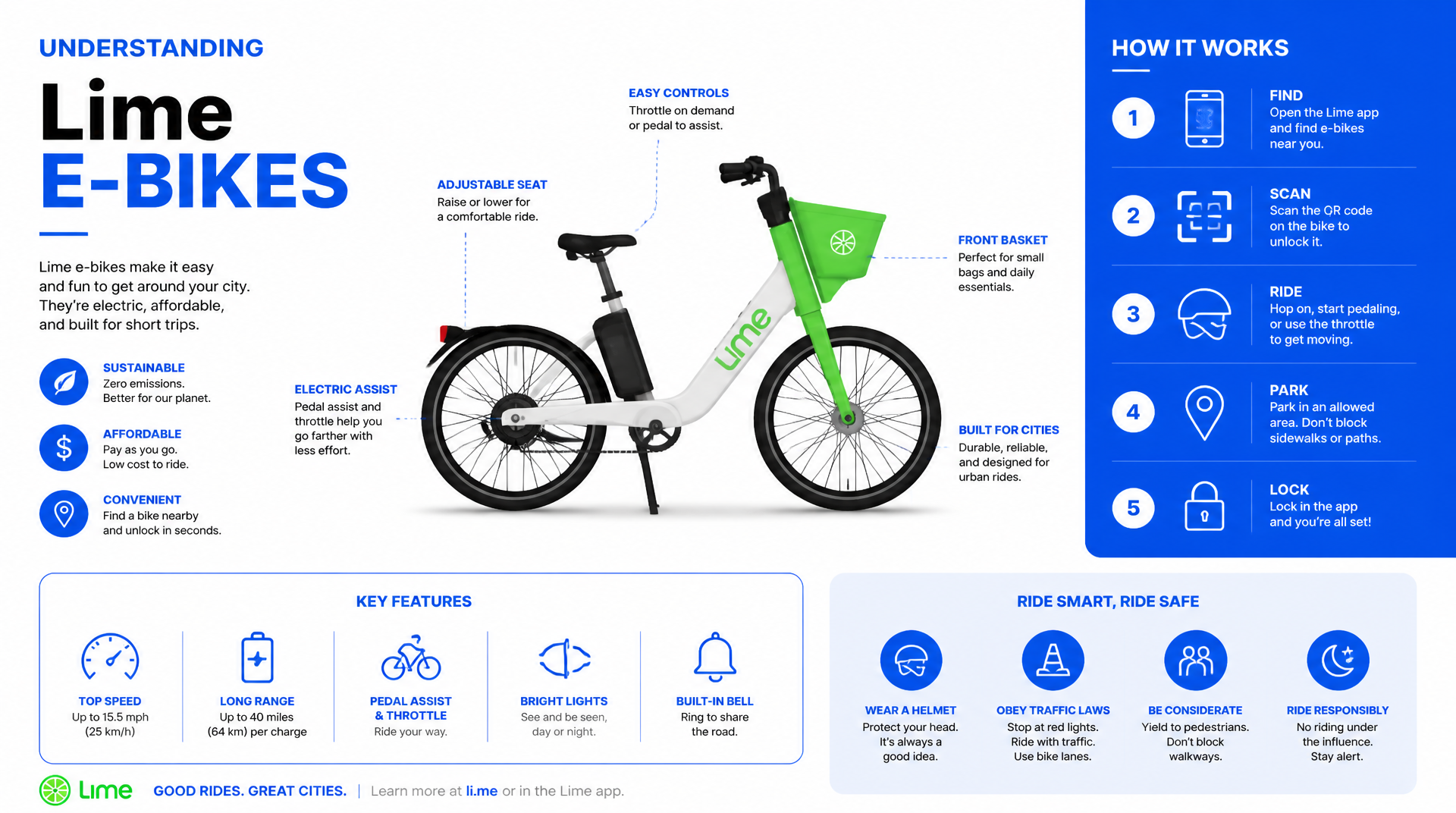
Lime e-bikes are dockless electric bicycles you rent by the minute through the Lime app. You unlock one with a QR code, ride up to around 20 mph (assisted pedaling), and park it anywhere in the designated service area when you’re done. The total cost combines a fixed unlock fee (typically $1) plus a per-minute rate (roughly $0.30–$0.45) depending on your city. Understanding these mechanics, pricing rules, and rental steps will save you time and avoid surprise charges.
Step-by-Step Rental Process
Renting a Lime e-bike takes about 60 seconds from app open to riding. Here’s the sequence:
1. Download and set up the Lime app (iOS or Android). Create an account, add a payment method (credit/debit card, PayPal, or Apple Pay), and allow location access so the app can show nearby bikes.
2. Find a bike on the map. Bikes appear as small icons; you can reserve a specific bike for 10 minutes free of charge before the rental clock starts.
3. Check the battery level shown in the app for each bike. Choose one with at least 30% charge unless your trip is very short (under 2 miles). A full charge covers roughly 25–40 miles of flat riding.
4. Scan the QR code on the handlebar or rear fender to unlock. You’ll hear a click and the bike’s headlight will flash. If scanning fails, enter the bike’s ID number manually.
5. Start riding. Push off with your feet to engage the pedal assist. Twist the throttle (if equipped) for power without pedaling. Lime e-bikes use a cadence sensor – you must pedal at least slightly for the motor to engage.
6. Lock the bike when you arrive. Park within the designated service area (shown in the app as a shaded zone). Outside that zone, you can still lock but incur an extra fee (typically $20). Pull down the rear-wheel lock lever or lock the cable to a fixed object if in a high-theft area.
7. Verify the ride ended. Open the app and confirm that the ride status shows “Ended” and a receipt appears. If the app still shows an active ride, you haven’t locked properly – try locking again (pull the lever firmly) or refresh the Bluetooth connection by closing and reopening the app. If the issue persists, contact Lime support through the help chat.
8. Check your receipt in the app’s ride history. The final charge includes the unlock fee plus per-minute time, minus any promo credits or passes you applied.
Tip: If you pause for errands, use the “Hold” feature (available in some cities). It locks the bike for a small fee (about $0.15/minute) so no one else can take it while you step away.
What a Ride Costs
Pricing varies by city, but the structure is consistent across North America.
| Fee type | Typical range | Notes |
|---|---|---|
| Unlock fee | $1.00 | Charged once per ride. May be waived if you own a Lime Pass or subscription. |
| Per-minute rate | $0.30 – $0.45 | Usually higher in dense urban areas (e.g., San Francisco, New York) and lower in smaller cities. |
| Per-minute rate (Lime Access) | ~$0.15 | Reduced rate for qualifying low-income riders. |
| Lock fee outside service area | $20 | Triggers automatically if you end the ride outside the geofenced zone. |
| Hold fee | $0.15/minute | Only applies when you use the Hold feature. |
| Damaged bike fee | Up to $1,200 | Charged if you return a bike in broken condition (e.g., flat tire, broken handlebars) – not from normal use, but from misuse or vandalism. |
What affects your total ride cost:
- Ride time: a 10-minute ride at $0.35/min + $1 unlock = $4.50.
- Promotional passes: Lime offers daily, monthly, or annual passes that include free unlocks and reduced per-minute rates. For frequent riders (more than 3–4 trips per week), a $29.99 monthly pass often pays for itself.
- Surge pricing: In high-demand areas (after concerts, sports events, rush hour), the per-minute rate can double temporarily. The app shows a “surge” indicator before you unlock.
How to estimate your fare before you ride: Open the app, tap a bike, and use the trip planner. Enter your destination; Lime calculates estimated price and time. This is more accurate than a manual guess because it factors in local rate and any passes you hold.
How the Bike Works
Three main components make a Lime e-bike rideable: the motor system, the locking mechanism, and the app-based control.
Motor and Pedal Assist
Lime e-bikes use a 250–350W hub motor in the rear wheel. The motor only activates when you pedal (cadence sensor) or when you twist the throttle (on models with a thumb throttle). Top assisted speed is 20 mph; the motor cuts out above that. The bike also has a walk-assist mode for pushing it uphill (hold the throttle while walking).
Battery and Range
The removable lithium-ion battery (36V, ~14Ah) sits in the downtube. A full charge provides 25–40 miles of range depending on rider weight, terrain, and assist level. Lime swaps batteries in the field via swappable packs – you never need to charge the bike yourself. The app shows the battery percentage; below 10% the bike’s motor reduces power and speed to preserve enough range for the next renter to return it.
The Lock and Parking
Lime e-bikes have a wheel lock that stops the rear wheel when engaged. On newer models, the lock is integrated into the rear frame; older models use a cable lock you thread through the wheel. To end your ride, you push the lock lever down (or pull the cable tight) and confirm in the app. The bike will not let you complete the ride until the app detects the lock is engaged. You must also park upright, not blocking pedestrian paths or driveways, and within the service zone.
App and GPS
Each bike has a built-in 4G GPS tracker. The app uses that to show bike locations, battery levels, and service area boundaries. If you lose the bike mid-ride (e.g., you lock it and walk away without ending the ride), GPS lets you track it. You can end the ride remotely if you left it unlocked – but only while the bike is stationary and you’re within a short distance.
Troubleshooting Common Problems
Even with a straightforward system, a few pitfalls trip up new riders.
Bike won’t unlock – The app may show the bike as available, but the QR code is damaged or the bike’s Bluetooth module is offline. Try scanning again, then manually enter the bike ID. If still no luck, report it in the app and choose another bike.
Ride doesn’t end – If you lock the bike but the app still shows an active ride, refresh the Bluetooth connection (close and reopen the app). To verify the fix worked: Open the app and check the main map screen. The bike icon should disappear from your current location, and the ride status at the top of the screen should read “No active ride.” If it still says “Ride in progress,” try locking the bike again (ensure the lock lever clicks fully). As a last resort, contact Lime support through the app’s help chat. They can end the ride manually, but you may be charged for the extra time until they process it (Lime usually refunds the overcharge after review).
Extra fee for parking outside zone – The app shows a red warning if you try to end a ride outside the service area. The fee is applied automatically. To avoid it, always zoom out on the map before locking to confirm you’re inside the shaded zone.
Battery runs out mid-ride – If you start with less than 25% charge on a hilly route, the motor may cut out before you expect. Pedal without assist (still heavy) or walk the bike to the nearest dock. Lime does not refund for dead batteries unless the bike showed 30%+ at unlock and died immediately.
When to Use a Lime E-Bike
Lime e-bikes excel for short, one-way trips (1–5 miles) in dense urban areas where parking is scarce and you don’t want to haul your own bike. They are less practical for:
- Commute longer than 10 miles – cost per ride adds up quickly; a monthly pass helps but still may exceed the cost of owning a personal e-bike.
- Very short trips under 0.5 miles – the $1 unlock fee makes them more expensive per mile than walking.
- Off-road or poor pavement – Lime e-bikes have narrow tires and limited suspension; they’re designed for paved streets and bike paths.
The bottom line: Lime e-bikes are a flexible, on-demand alternative to walking, bus, or ride-hail for the final leg of a trip, as long as you check pricing first and park in the right zone.