E-Bike Throttle Not Working? Complete Troubleshooting and Repair Guide
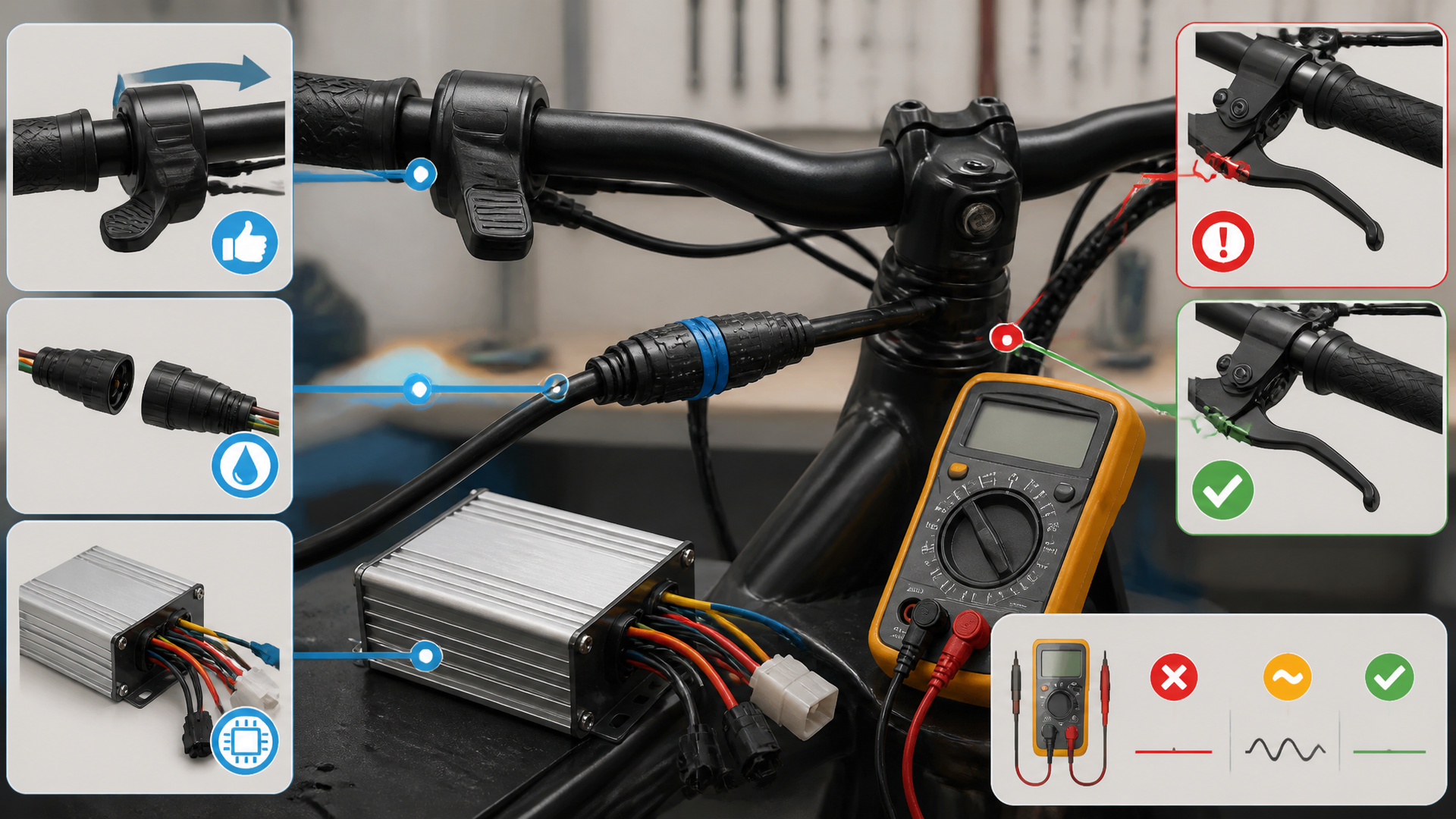
Most e-bike throttle failures come from a loose or corroded connector at the handlebar or controller. Unplug that connector first—inspect both halves for bent pins, green corrosion, or moisture. Clean with electrical contact cleaner, let dry, and reseat firmly. If that doesn’t restore throttle response, work through the diagnostic flow below in order.
Start Here: Battery and Connections
A discharged battery or loose main power wire can power the display but still cut throttle output. Run these checks before touching any component:
- Battery voltage – Below 80% of nominal (e.g., 36V pack under 30V, 48V pack under 40V) and the BMS may disable the throttle to protect cells. Charge fully and retest.
- Key switch / ignition lock – Some bikes have a separate ignition circuit for throttle power. Cycle it off and on while watching for any dash light change.
- Brake cutoff sensors – Squeeze and release each brake lever firmly. A stuck magnetic sensor or jammed lever switch holds the throttle disabled permanently. On hydraulic brakes, check the sensor wire hasn’t pulled loose at the lever.
- Kill switch or key fob – If your bike has a handlebar kill switch or wireless cutoff, verify it’s in the run position. A paired fob left in a bag can also interrupt throttle signal.
Branch after this block: If the display shows an error code like “Err04” or “Err05” after these checks, the fault is likely a motor hall sensor or controller issue—skip to the stop-and-shop section below. No error code? Continue with connector and component checks.
Match Your Symptoms
| Symptom | Likely Cause | First Action |
|---|---|---|
| Throttle dead, display works | Loose connector, blown fuse, or no 5V reference | Reseat throttle plug; measure voltage at connector pins |
| Throttle cuts in and out mid-ride | Corroded pins or broken wire strain at the grip | Clean connectors with contact spray; gently wiggle wire near twist grip |
| Motor runs full speed on partial twist | Throttle signal wire shorted to +5V or ground | Stop riding immediately—replace throttle unit |
| No throttle but pedal assist works fine | Brake sensor stuck closed or throttle signal pin broken | Unplug brake sensor temporarily; test signal pin with multimeter |
| Throttle worked on last ride, now silent | Display-level throttle disable setting active | Enter display settings menu and re-enable throttle function |
| Throttle jerks or stutters | Wiring chafed through at the head tube or stem | Inspect wiring bundle where it enters the frame; repair or wrap damaged section |
Common Faults You Can Fix
Throttle Connector Corrosion or Bent Pins
JST, Higo, and Molex connectors on e-bikes sit low on the handlebar where road splash gets in. One bent pin or a layer of green oxide acts as an open circuit. Evidence you’ll see: The plug clicks together fine, the display works, but the throttle does nothing when twisted.
Fix:
- Unplug and inspect both connector halves under bright light.
- Straighten any bent pin using a small flathead screwdriver or dental pick.
- Spray both sides with electrical contact cleaner, then blow dry with compressed air (or let sit five minutes).
- Apply a dab of dielectric grease to the pins before reconnecting—this prevents recurrence, especially on bikes ridden in wet commuting conditions.
Verify: Turn the battery on, twist the throttle, and watch the motor. If it spins, the fix worked. If not, move to the next cause.
Hall Sensor Failure Inside the Throttle
Most e-bike throttles use a Hall-effect sensor that outputs a smooth voltage curve from roughly 0.8V at rest to 4.2V at full twist. When the sensor fails internally, output either stays flat at 0V or jumps immediately to 5V with no gradual ramp. Evidence: The display shows normal battery voltage but twisting the throttle produces no motor response—no movement, no sound.
Check with a multimeter (concrete steps):
- Set your multimeter to DC volts (20V scale).
- Back-probe the throttle signal wire (typically green or white) while the throttle is plugged in and battery on. A sewing pin works as a probe—push it carefully into the wire insulation near the connector.
- Slowly rotate the throttle grip through its full range. You should see voltage rise smoothly from ~0.8V to ~4.2V.
- If it reads 0V and never changes, or jumps from 0V to 5V instantly with no in-between, the Hall sensor is dead.
Fix: Replace the entire throttle unit. Hall sensors are sealed inside the housing and cannot be repaired individually. On twist-grip designs, the replacement typically costs $15–$35 and requires no special tools—just a hex key for the handlebar clamp and reconnecting the plug.
Throttle Signal Wire Damage at the Handlebar or Stem
The throttle wire bundle takes constant flexing at the stem entry point and the twist-grip base. Over time, internal copper strands fatigue and break while the outer insulation stays intact. Evidence: Throttle works when the bars are straight but cuts out when turned fully left or right.
Fix:
- Locate the section of wire between the throttle housing and the frame entry point.
- With the battery off, carefully peel back any tape or sheath and check for a flat spot, kink, or visible break.
- If you find a break, either solder and heat-shrink the repair or replace the full throttle cable. Crimp connectors are not reliable here due to vibration.
Display Throttle Setting Disabled
Many e-bike displays have a hidden menu setting that turns off throttle-only operation. Commuter bikes sold in regions with class restrictions often ship with this disabled from the factory. Evidence: Pedal assist works normally but the throttle produces no response at all, even after checking all connectors.
Fix:
- Power cycle the bike off and on.
- Check your display manual for a throttle enable setting—on KT controllers this is often parameter “P12” or “C5” set to a value other than 0.
- If the setting is off (0), change it to 1 (on) or 2 (on + low speed start).
- Save and exit the menu, then test throttle response.
Brake
Explore This Topic
- Back to Troubleshoot
- Back to Intent Optimization
Related guides in this cluster: